TwoTouch Timer
Publisher Description
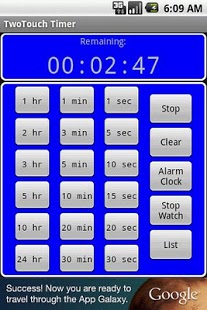
A quick & easy to use countdown timer, alarm clock and stopwatch application. Great for exercise, sports, meetings, cooking, egg timer, etc.
Time buttons for many common timers
Desktop widgets and/or Multiple alarms list
Vibrate options
Custom Snooze feature
Record Laps on stopwatch
Repeating Alarms at any interval
User selectable alarm sounds
One touch start for common countdown timers
Preset timers
Option to start a stopwatch on alarm
Notification options
Color themes
Large display modes for counters or current time
Notes -
Ads require internet access. If ads are not OK, please try our paid version.
To switch to OneTouch mode, turn on the option that says "Start timer when time is selected".
Since Google does not send market comments to developers, please send all problem reports and change requests to the developer email address - andrexxapps@gmail.com
About TwoTouch Timer
The company that develops TwoTouch Timer is AndRexx. The latest version released by its developer is 1.0 . This app was rated by 2 users of our site and has an average rating of 4.8.
To install TwoTouch Timer on your Android device, just click the green Continue To App button above to start the installation process. The app is listed on our website since 2012-11-02 and was downloaded 127 times. We have already checked if the download link is safe, however for your own protection we recommend that you scan the downloaded app with your antivirus. Your antivirus may detect the TwoTouch Timer as malware as malware if the download link to com.andrexx.twottads is broken.
How to install TwoTouch Timer on your Android device:
- Click on the Continue To App button on our website. This will redirect you to Google Play.
- Once the TwoTouch Timer is shown in the Google Play listing of your Android device, you can start its download and installation. Tap on the Install button located below the search bar and to the right of the app icon.
- A pop-up window with the permissions required by TwoTouch Timer will be shown. Click on Accept to continue the process.
- TwoTouch Timer will be downloaded onto your device, displaying a progress. Once the download completes, the installation will start and you'll get a notification after the installation is finished.
Program Details
System requirements
Download information
Pricing
Version History
version Varies with device
posted on 2012-11-02
version 2.1.3
posted on 2011-05-25
Several fixes and updates
